

An app that only speaks English asks a large share of its potential users to do extra work before they get any value from it. Some push through. Most uninstall, or never install at all. Localization removes that friction, and it does more than replace words: it can influence how users discover the app, navigate it, complete important actions, and continue using it.
What Is Mobile App Localization?
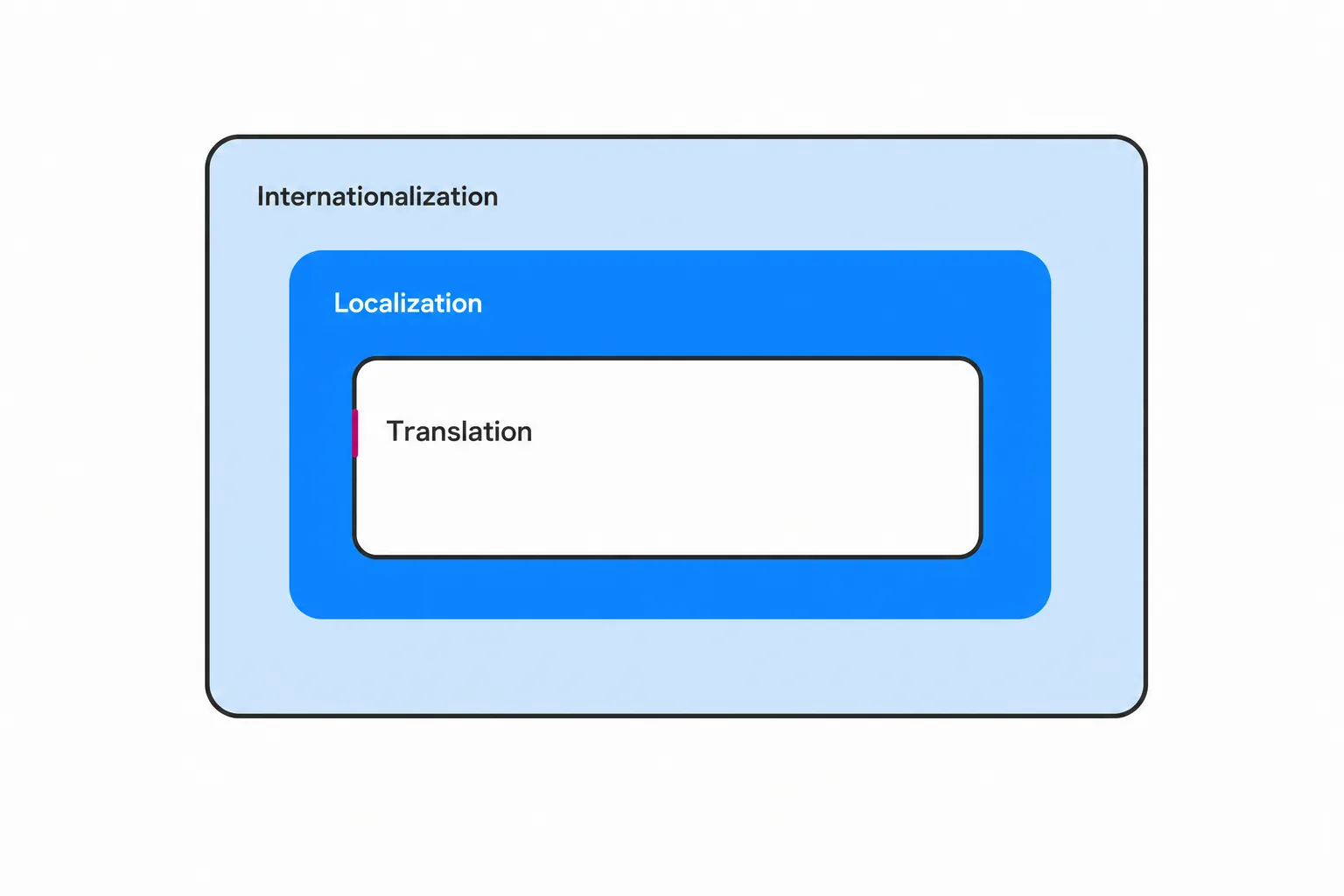
Localizing a mobile app means adapting its language, visuals, formats, and behavior so it feels built for a specific market rather than translated into one. CCI Group’s localization and multimedia services support digital content across languages, formats, and markets.
Three terms get used interchangeably, and the differences matter when you are scoping a project:
| Term | What it means |
|---|---|
| Translation | Converts the words. A button that says “Continue” now says the equivalent in the target language. |
| Localization | Adapts the whole experience: the words, plus currency, date and number formats, imagery, tone and formality, legal notices, payment methods, and screen layout. |
| Internationalization | The engineering groundwork that makes localization possible. It happens in the codebase, before any linguist touches the project. |
You do not need to speak the target languages, or know translation industry terminology, to manage this well. What you do need to know is that localization touches product, marketing, legal, and customer support, not only a strings file handed to a translator.
Why localizing a mobile app matters
Reach feeds installs. Installs that people can actually use feed retention. Retention feeds revenue and lowers support load. Skip a link in that chain and the rest underperforms.
It opens the app to users who will never use it in English
Mobile apps often serve markets where many potential users prefer a language other than English. An English-only app caps its own addressable market, and the cap is invisible in your analytics because those users never show up as churn. They simply never arrive.
Going global can also start inside one country. Large numbers of US residents speak a language other than English at home, and public agencies, school districts, health systems, and utilities increasingly deliver services through mobile apps. For those organizations, an English-only app is not just a growth problem. It is a service delivery gap for residents with limited English proficiency (LEP).
It removes friction from everyday use
Users abandon flows they cannot read. The expensive ones are predictable: account creation, permission prompts, checkout, and form validation errors.
Error messages and empty states are the most-skipped strings in a localization project, and among the most consequential. A user who hits an untranslated “Invalid entry” during signup has no path forward.
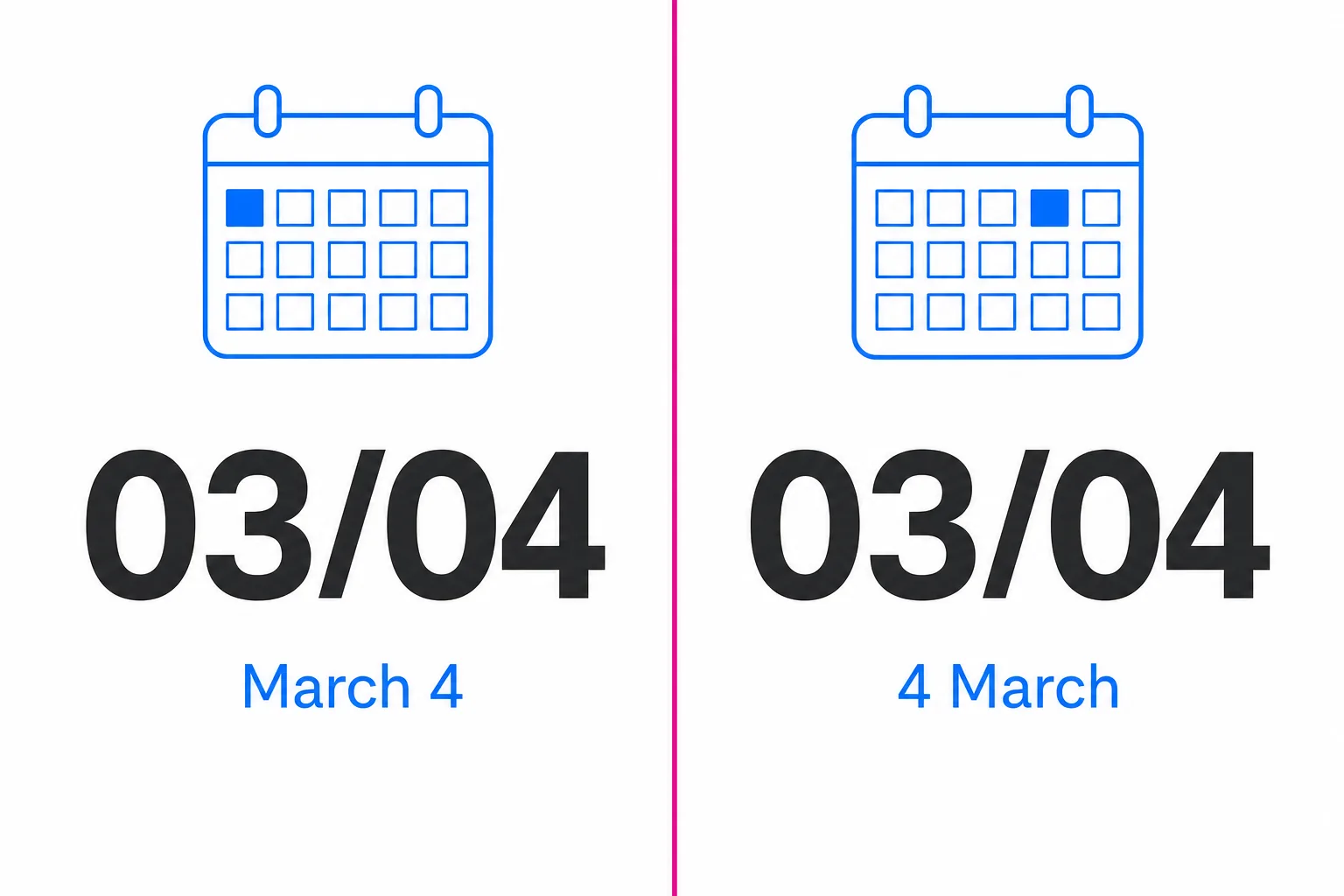
Formats matter as much as vocabulary. A date shown as 03/04 means two different days depending on the market. Address fields that assume a US structure, phone masks that reject valid local numbers, and measurements in the wrong unit produce real input mistakes, not just awkward reading.
It builds trust and signals respect
Tone, formality level, and imagery carry as much meaning as vocabulary. Addressing a user casually reads as friendly in one market and careless in another. Colors, gestures, icons, and stock photography that feel neutral at home can land badly elsewhere.
Trust matters most in high-stakes categories: health, legal, finance, emergency services, and government benefits. A resident deciding whether to report an incident, submit a benefits application, or share medical history is judging whether your organization takes them seriously. The interface language is the first evidence they get.
It improves app store visibility (ASO)
Store listings are indexed per locale. Title, subtitle, keyword fields, description, and screenshots can all be localized, which means a localized listing can surface for searches your English listing could never match. Research keywords fresh for each market rather than translating the ones you already rank for, since people search in their own phrasing, not in a translation of yours.
Localizing the store listing can be a relatively focused way to test demand before committing to full in-app localization. It costs a fraction of a full product localization and tells you whether demand exists before you commit engineering time. Localized screenshots can help users understand the app before downloading it, especially when the images demonstrate important features and workflows.
It Can Support Revenue and Conversion Goals
Local currency, familiar payment methods, and market-appropriate pricing copy can reduce confusion and support checkout completion. Subscription and in-app purchase screens are short, high-leverage content that deserves human translation and careful review.
Watch for the vanity metric trap. If downloads climb in a new market but retention and revenue do not, the localization stopped at the surface: the listing was localized, and the product was not.
It Can Reduce Avoidable Support Requests
Every instruction a user cannot read becomes a support ticket, a refund request, or a failed transaction. Unlocalized apps push confusion downstream into a queue somebody has to staff.
Support content belongs inside the localization scope: help center articles, chat macros, automated transactional emails, and push notifications. An app localized into six languages that emails receipts in English has not finished the job.
What you actually localize inside an app
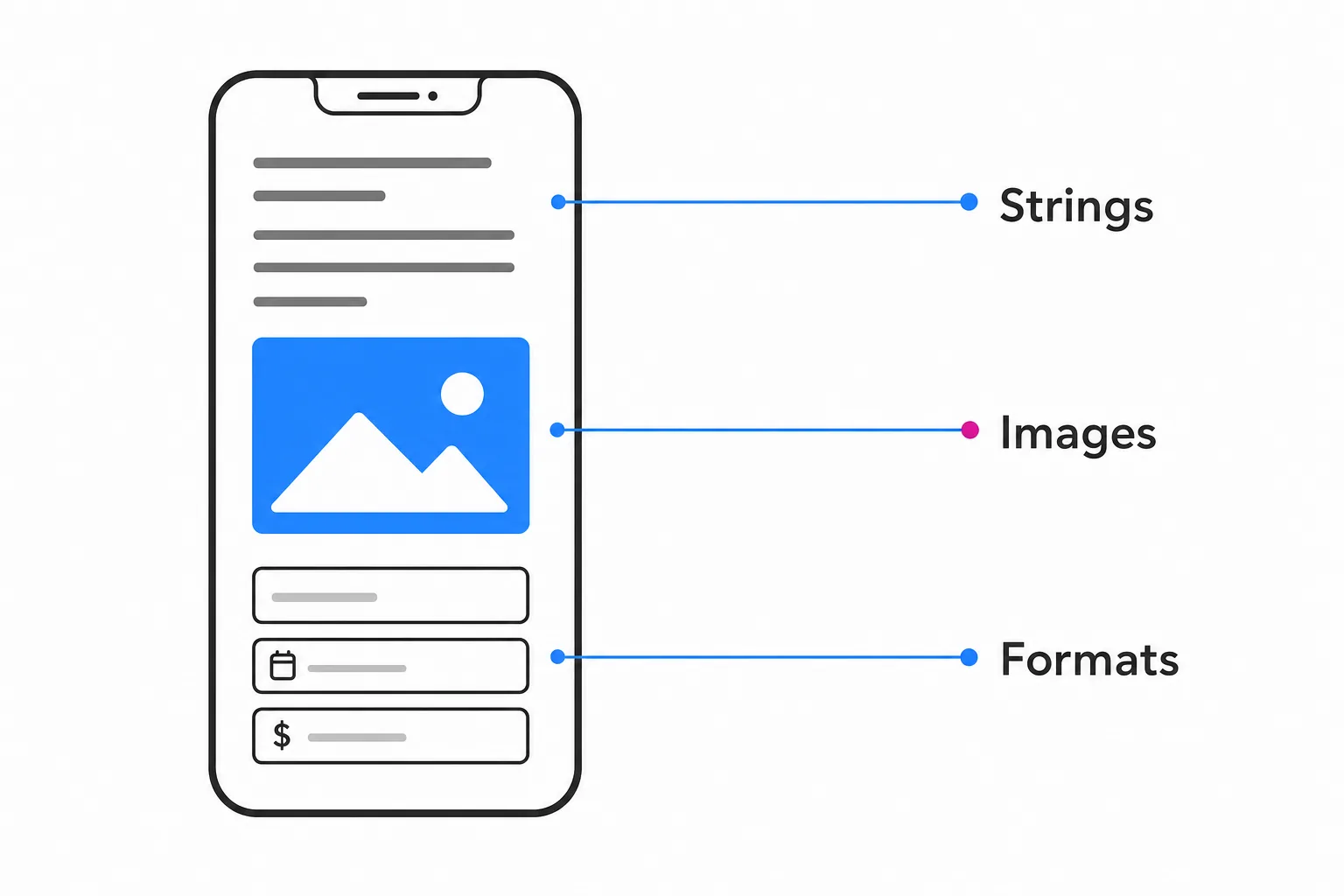
- Interface strings, including plurals and any sentence assembled at runtime
- Images with embedded text, icons, illustrations, and color choices
- Dates, times, time zones, calendars, number and currency formats, units, name and address fields, and phone formats
- Layout behavior: text expansion (German and Finnish commonly run longer), contraction (Japanese and Chinese often run shorter), and right-to-left mirroring for Arabic and Hebrew
- Push notifications, email templates, receipts, and onboarding video subtitles or voiceover
- Legal and policy content: privacy policy, consent language, terms, age gates, and regional disclosures
- The app store listing, treated as its own deliverable with its own review cycle
Language Access and Accessibility for Public-Sector Apps
For government, education, healthcare, and public safety organizations, localization is not only a growth decision.
Organizations that receive federal financial assistance have long-standing obligations to provide meaningful access to their programs for people with limited English proficiency. A resident-facing app may form part of how an organization delivers access to its programs and services, so language-access obligations should be evaluated alongside other communication channels.
Confirm the specifics with your own counsel or compliance office, because obligations vary by program and funding source. Review the HHS guidance on limited English proficiency and explore CCI Group’s language solutions for government and regulated industries.
Accessibility runs alongside language. Federal agencies must evaluate covered mobile apps and other information and communication technology under the Revised Section 508 Standards, which incorporate applicable WCAG 2.0 Level A and AA criteria. State and local government apps may be subject to different accessibility requirements, including ADA Title II rules.
There is an overlap most teams miss: screen readers need correctly tagged language attributes to pronounce translated text properly. Untagged translated content gets read aloud with the wrong pronunciation rules, which makes it unusable for the people who depend on it.
Two more considerations:
- Data privacy and residency rules differ by region, which changes what your consent screens must say and when they must appear.
- Healthcare app teams should first determine whether the organization and its vendors are subject to HIPAA as covered entities or business associates, then apply the required privacy, security, and contractual safeguards to translated content.
For emergency and public safety apps, the stakes are plain.
Related readingMultimedia Solutions: The Power of Language and Translation Services – My CCI Group | Language Services & Multilingual NotarizationRead the guide →An alert or instruction a resident cannot read under pressure has failed, however fast it was delivered.
The technical foundation: internationalize before you translate
Four rules prevent most localization defects:
1. Never hardcode a user-visible string.
2. Never build a sentence by concatenating fragments. Grammar and word order differ across languages, and concatenation produces nonsense.
3. Never bake text into an image.
4. Use locale-aware formatting APIs for dates, numbers, and currency instead of assembling them by hand.
Externalize strings into resource files and add translator-facing comments. A linguist looking at the word “Open” with no context cannot tell whether it is a button, a status, or an adjective, and the target language may need three different words.
Before you spend money on translation, run pseudolocalization: replace strings with accented, lengthened placeholder text and walk the app. It exposes truncation, clipped labels, overlapping elements, and hardcoded strings you missed, at close to zero cost.
iOS app localization essentials
Modern Xcode projects use String Catalogs, which consolidate strings, plurals, and device variants in one file. Older codebases still rely on `.strings` and `.stringsdict`, and both remain workable. Use Base Internationalization so layouts are defined once, and rely on Auto Layout constraints rather than fixed widths so text expansion does not break screens.
Product page metadata and screenshots are localized per locale in App Store Connect, separately from the app binary. Test by setting app language and region per scheme in the simulator, and review every screen, not just the home tab.
Android app localization essentials
Android uses resource qualifiers: `res/values-es`, `res/values-fr`, and so on, with dedicated plural resources and locale-aware formatting. Google’s Android localization documentation explains how to provide alternative language and locale resources. Enable per-app language preferences so a user can set your app to a different language than their device.
Store listing localization happens in the Google Play Console and supports regional rollout, which pairs well with testing one market at a time. Turn on right-to-left support and verify mirrored layouts on real screens rather than assuming the framework handled it.
Flutter and other cross-platform frameworks
Flutter’s standard path is the `flutter_localizations` package together with `intl`, using ARB files that generate localized message lookup classes. React Native and similar stacks work the same way conceptually.
One thing cross-platform frameworks do not unify: store listings. Those stay platform-specific, so a Flutter app still needs localized metadata in both App Store Connect and the Play Console. The framework changes the file format, not the discipline.
A practical app localization workflow
1. Pick markets with evidence. Existing traffic by locale, store search demand, revenue potential, and regulatory obligation beat intuition.
2. Internationalize the codebase first so translation is never blocked waiting on engineering.
3. Build a localization kit: string files, screenshots, a glossary, a term base, a style guide, tone rules, and a do-not-translate list for product names and legal terms.
4. Translate with qualified human linguists using a Translation, Editing, Proofreading (TEP) process, with subject-matter linguists for legal, medical, and technical content.
5. Run linguistic QA in context on real builds. Reviewing a spreadsheet catches typos; reviewing the app catches truncation, wrong-register buttons, and strings that read fine alone and wrong in place.
6. Localize the store listing and creative assets as a tracked deliverable.
7. Soft launch in one locale, measure, then expand.
8. Treat localization as continuous. New strings ship with every release. Tie translation to your release cycle instead of running a one-time project.
Partial vs Full App Localization
Partial localization may cover store metadata, onboarding, checkout, or other high-priority flows to test demand. Full localization extends across the interface, support content, notifications, policies, media, and ongoing releases. Partial localization should be clearly scoped so users do not enter a localized flow and unexpectedly encounter critical English-only content.
Hypothetical Mobile App Localization Example
Consider a hypothetical city-services app preparing to support Spanish-speaking residents. The team could begin by localizing the app-store listing, account setup, service-request forms, validation messages, notifications, and help content.
During QA, the team might discover that longer Spanish labels are clipped and that several error messages remain hardcoded in English. Fixing those issues before release would create a more complete experience than translating the store listing alone. This is an illustrative scenario, not a CCI Group client result.
Mobile App Localization Project Checklist
- Target markets selected using audience, demand, or compliance data
- Codebase internationalized
- User-facing strings externalized
- Glossary and style guide approved
- Screenshots and translator context supplied
- Text expansion and right-to-left layouts tested
- Accessibility requirements tested
- Store listing and creative assets localized
- Legal, privacy, and consent content reviewed
- In-context linguistic QA completed
- Performance KPIs established by locale
- Localization updates included in the release workflow
Machine translation versus human linguists: where each belongs
Machine translation earns a place in this workflow. CCI Group’s professional translation services can support content that requires human linguistic review and subject-matter expertise. For high-volume, low-risk content such as user-generated text or a large help center backlog, it can be a reasonable starting point, especially with human post-editing and defined quality expectations.
It is the wrong tool for content where being wrong is expensive: legal terms, consent language, medical instructions, safety steps, payment and refund copy, and anything a regulator or a court might read. Idioms, humor, slang, and brand voice remain human territory.
There is also a structural limit. Short interface strings arrive without context, and one English word often maps to several possible target words. A machine picks one. A linguist with screenshots and a glossary picks the right one.
When translated text is not enough: live language support inside the app
Localization makes the app interface accessible in selected languages, but it does not replace live communication when users need to speak with staff. Some government, healthcare, legal, or customer-service apps may therefore connect users to phone, video, and on-site interpreting services for intake, support, appointments, or urgent communication.
Related language deliverables may include subtitles, transcription, voiceovers, help-center content, and website localization. Keeping these elements within one terminology and review process helps the app and its supporting channels communicate consistently.
How to measure whether localization worked
- Store page conversion rate by locale, measured before and after listing localization
- Day 1 and Day 30 retention split by app language, not just by country, since country and language do not map one-to-one
- Revenue per user and checkout completion by locale
- Support ticket volume and app review sentiment by language
- UI bug reports for truncation, overlap, and untranslated strings, which work as a direct quality signal on your localization process
Set a review cadence that matches the app’s release schedule, market investment, and available data. Low retention with high installs points at the product. Low installs with good retention points to the listing.
Mistakes that make a localized app feel foreign
- Translating the app but leaving the store listing, push notifications, and transactional emails in English
- Building sentences by concatenation, or hardcoding plural forms, which produces broken grammar in most target languages
- Sending translators a spreadsheet with no screenshots and no context
- Ignoring text expansion and right-to-left layouts until after release
- Machine-translating legal, privacy, and consent content
- Assuming one Spanish, one Arabic, or one Chinese covers every market that speaks it
- Treating localization as a launch task instead of a release-by-release habit
Frequently asked questions
What is the difference between app translation and app localization?
How many languages should I launch with?
What drives the cost of localizing a mobile app?
Does localization really help app store rankings?
Can I just use machine translation for everything?
Is localizing an iOS app different from localizing an Android or Flutter app?
How to Start Localizing Your Mobile App
Localization is a growth and access decision, not a translation line item. It determines who can find your app, who can use it, who trusts it enough to pay or to submit sensitive information, and how many of them end up in your support queue.
The low-risk starting point: localize the store listing and the onboarding flow for one language, measure conversion and Day 30 retention against your baseline, then expand with evidence instead of assumption.
If you would rather hand the linguistic side to a partner and keep your team focused on the product, CCI Group provides translation, digital localization, multimedia, and interpretation services. Request a localization consultation or [call (727) 657-3167](tel:\(727\)%20657-3167) to discuss your target languages, platforms, content types, technical workflow, and release schedule. Use Sourcewell Contract #081225-IDY if you are a public-sector buyer who needs a compliant, pre-negotiated route.